
By Ayaz Khan · 24 October 2026
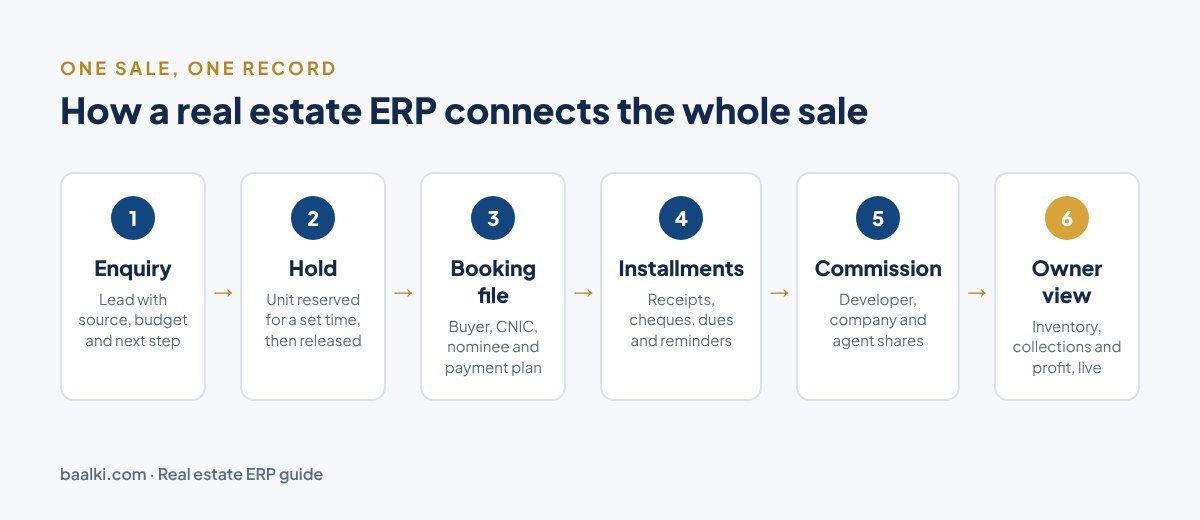
A real estate ERP is one connected system that runs the whole business of a property company: leads, inventory, bookings, payments, commission, accounts and reports. Instead of a register for bookings, an Excel sheet for installments and a WhatsApp group for holds, everyone works from the same live records.
That is the short answer. The longer answer matters more, because “real estate” covers very different businesses. Most ERP guides are written for landlords and property managers who collect rent. If your company sells plots, houses, flats or shops, often on installments, your needs are different. This guide explains those needs, the modules to look for, and how to choose without wasting money.
Why I wrote this: my family has been in real estate since 1970. My father, known in the market as “Baalk”, was a property agent for decades, and I still see how much of the business runs on paper files and diaries. Baalki, the software we build, is named after him. I’ve tried to keep this guide useful even if you never choose Baalki.
What is ERP, in plain words?
ERP stands for enterprise resource planning. The usual definition is “the integrated management of main business processes, often in real time” (Wikipedia). The research firm Gartner is credited with first using the acronym in the 1990s.
In practice, an ERP means one database that every department shares. When a sales agent books a unit, the accounts team sees the payment schedule, the owner’s dashboard updates, and the unit disappears from the available list. Nobody re-types anything.
A real estate ERP is an ERP built around the way property companies actually work.
Two kinds of real estate business, two kinds of ERP
Before comparing software, be clear about which business you run.
| Companies that manage and rent property | Companies that sell property | |
|---|---|---|
| Examples | Landlords, property managers, building owners | Developers, housing schemes, real estate marketing companies |
| Main money flow | Monthly rent, service charges | Down payment + installments over months or years |
| Inventory | Leased units, tenants | Plots, houses, flats, shops: available, on hold, booked, sold |
| Key documents | Leases, rent invoices | Booking files, receipts, allotment letters, transfer papers |
| Typical pain | Rent collection, maintenance requests | Double-selling, late installments, commission disputes, lost files |
| Software usually built for it | Property management ERPs (e.g. Yardi, MRI, AppFolio) | Sales-focused real estate ERPs |
Most of the big international names were built for the left-hand column. If you sell plots in a housing society, a property-management ERP can feel like the wrong tool: it is excellent at leases and weak at booking files and installment recovery.
The modules a sales-focused real estate ERP should have
If your company sells property, these are the modules that matter. Use this list when you watch any demo.
1. Leads and follow-up
Every enquiry, whether a call, walk-in, Facebook form or portal lead, should become a record with a source, budget, project interest and a next step with a date. You should be able to see which ad sources bring actual site visits and bookings, not just calls.
2. Live inventory with holds
This is where most double-selling starts. A good system shows every unit’s status (available, on hold, booked, sold, blocked) live to the whole team. Holds should expire automatically if no booking follows, so one agent cannot block a plot for a week “for a client”. (Our free plot booking form template includes an “inventory checked by” box for exactly this reason.)
3. Bookings and booking files
Booking a unit should create the buyer’s file in one flow: buyer details (CNIC, nominee), unit, price and payment plan. The unit should be reserved the moment the file is created, not when someone updates a register later.
4. Installments, receipts and dues
For installment sales this is the heart of the system. Look for:
- payment schedules generated from the plan you choose
- receipts for cash, bank transfer and cheques, with cheque clearance and bounce tracking
- a dues list sorted by the oldest overdue amount
- reminders to buyers before payments become late
For a deeper look, see how to track plot installments and cut late payments.
5. Recovery
Late money should be grouped by age (for example 1–30, 31–60, 61–90 and 90+ days), with a record of every call, visit and promise to pay. Notices should follow your policy, and cancelling a file should always be a human decision, never automatic.
6. Commission and the developer’s share
Marketing companies sell on behalf of developers, so every rupee received is split three ways: the developer’s money, the company’s commission, and the agent’s share. A real estate ERP should calculate this per project, release commission only on cleared money, and reverse it if a cheque bounces. This alone ends most month-end arguments. Our guide on how real estate commission works in Pakistan explains the common split methods.
7. Approvals and audit trail
Large payouts, refunds and transfers to developers should wait for the owner’s approval. Every change should leave a history, and mistakes should be reversed, not deleted. This protects you from both honest errors and fraud.
8. Document verification
Fake and duplicate files are a real problem in the Pakistani market. Printed booking files and receipts should carry a QR code or verification code that anyone can check online. Buyers trust you more, and fake papers become easy to catch. (See 8 checks to tell whether a plot file is genuine.)
9. Reports and owner dashboard
The owner should see inventory, collections, overdue amounts, payables to developers and agents, and profit per project without asking anyone. Reports should export to Excel.
10. Roles, branches and mobile access
Agents, managers, accounts staff, team leads and the owner each need different screens and permissions. Branches should have their own cash book and receipt numbers. Field teams need inventory and maps on the phone, ideally even without signal at the site.
11. Buyer portal (nice to have)
Buyers checking their own schedule, receipts and statement online save your office dozens of calls a week.
Real estate ERP vs CRM vs accounting software
These three are often confused.
| CRM | Accounting software | Real estate ERP | |
|---|---|---|---|
| Main job | Manage leads and customer contact | Record money, ledgers and tax | Run the whole operation end to end |
| Knows your inventory? | Usually no | No | Yes |
| Booking files and installments? | Rarely | Partly (as invoices) | Yes |
| Commission and developer share? | Rarely | Manually | Yes, calculated |
| Best for | Agents who only need follow-ups | Your accountant | Developers and marketing companies |
A CRM alone leaves the money side in Excel. Accounting software alone leaves sales and inventory in registers. The point of an ERP is that the sale and the money live in the same record.
Signs your company needs a real estate ERP
You probably need one if any of these sound familiar:
- The same plot has been promised to two buyers, or nearly was.
- Commission is “discussed” every month because the figures live in different diaries.
- Answering “how much is overdue?” takes a day of checking files.
- Payment history depends on one accounts person’s memory or register.
- A buyer has turned up with a file your office cannot confirm.
- You cannot see your business position without phoning your manager.
Which ERP is best for real estate?
There is no single best ERP. There is a best fit for your type of business:
- Mainly renting and managing buildings: property management ERPs such as Yardi, MRI or AppFolio are the usual shortlist.
- Large developers that also run construction, procurement and complex finance: general ERP platforms are commonly evaluated, for example Oracle NetSuite, Microsoft Dynamics 365, SAP, Sage and Acumatica (ERP Research lists these among its options for real estate development). They are powerful but usually need consultants and long implementations.
- Developers and marketing companies whose main work is selling units on installments, as in most Pakistani housing schemes: a sales-focused real estate ERP will fit better, because inventory, booking files, installments, recovery and commission are built in rather than customised.
Baalki is in the third group. It is built for real estate marketing companies and developers in Pakistan.
How to choose: a 10-question checklist
Ask every vendor these questions, and ask them to show you, with your own data if possible:
| # | Question to ask | Why it matters |
|---|---|---|
| 1 | Can two agents hold or book the same unit at the same time? | Tests double-selling protection |
| 2 | Do holds expire automatically? | Stops units being blocked for days |
| 3 | Show me a booking with a custom installment plan. | Your real payment plans must fit |
| 4 | What happens to commission when a cheque bounces? | Commission should reverse automatically |
| 5 | How is the developer’s money kept separate from ours? | Avoids mixing trust money with income |
| 6 | Can a buyer or bank verify a file or receipt online? | Fraud protection and buyer trust |
| 7 | Can our existing inventory and customer files, with past payments, be imported? | Switching cost and history |
| 8 | Who can see what? Show me an agent’s screen. | Data protection inside your team |
| 9 | Does it work on agents’ phones at the site? | Field teams live on mobile |
| 10 | What is the full cost: setup, monthly fee, extra users, add-ons? | No surprises later |
What does a real estate ERP cost?
Prices vary too widely to quote a fair “average”. What drives the price:
- Type of product: international ERP platforms usually involve licences plus implementation partners. Industry-specific SaaS tools usually charge a setup fee plus a monthly subscription.
- Size: number of users, projects and branches.
- Data migration: how much history (customers, files, past payments) must be brought in.
- Customisation: every custom feature adds cost and slows upgrades.
Always ask for a written quote that lists setup, monthly fees and any add-ons separately. Baalki, for example, prices as a one-time guided setup plus a monthly plan sized to your team, projects and branches, with a 15-day trial (see pricing).
How to switch from registers and Excel without chaos
- Clean your inventory list first: one row per unit, with status and price.
- Collect active customer files with payments received so far.
- Set up developers, projects and commission terms before the first booking.
- Invite the team with clear roles, so agents only see what they need.
- Run the old register and the new system side by side for a month and compare monthly totals before retiring the paper.
- Start new bookings in the system from day one, so history builds up correctly.
Legacy Group, a real estate marketing company in Peshawar, made this move from registers and Excel. In the words of its CEO, Danyal: “Nothing goes missing, the office is paperless, and I can see exactly where the business stands every day.” (Read the story.)
FAQ
Is a real estate ERP only for big companies?
No. Cloud-based systems are priced by size, and small marketing companies often feel the pain of double-selling and lost payment records most, because one mistake hurts a small business more.
What is the difference between ERP and CRM in real estate?
A CRM manages leads and customer contact. An ERP also runs inventory, bookings, installments, commission and accounts, so the sale and the money are in one record.
Can an ERP handle installment plans and cheque payments?
A sales-focused real estate ERP should. Ask to see a custom payment plan, a bounced cheque, and how dues and commission update afterwards.
How long does it take to start using one?
It depends on how clean your data is and how much history you import. Industry-specific SaaS tools are usually quicker; Baalki, for example, is set up around your company in days with a guided setup. Large ERP platforms usually take much longer, because they are configured by consultants.
Next step
If you sell plots, houses or shops and still run on registers, Excel and WhatsApp, the checklist above will help you judge any system. If you’d like to see how Baalki handles leads, live inventory, booking files, installments and commission with your own projects, book a 30-minute live demo or explore the features.