Sales operations software for real estate marketing companies
Every lead, plot, booking and payment, under control.
Baalki connects your sales team, live inventory and money in one workspace. Follow up every enquiry, prevent double-selling, track every Booking File and installment, and see exactly what is owed to developers, agents and your company.
- Built for real estate marketing companies
- Works on phone and desktop
- Commission calculated automatically
- Guided setup by our team
Why companies switch
Registers, spreadsheets and WhatsApp groups are costing you sales
Most marketing companies still run their business across paper, Excel and personal phones. The result is avoidable disputes, missed collections and decisions made without the full picture.
Double-sold inventory
Availability lives in a forwarded list. Two agents commit the same plot, and the company absorbs the dispute.
Enquiries that go cold
Leads from Facebook, portals, calls and walk-ins sit in personal phones. Follow-ups depend on someone’s memory.
Commission disputes
Agents, managers and accounts keep separate numbers for what was earned, released and paid.
Unclear money position
Collections arrive, but how much belongs to the developer, the agents and the company is worked out by hand.
Missed installments
Late payers surface only when the developer asks, and bounced cheques go unfollowed.
Records that leave with people
When a staff member leaves, their register and the payment history in it leave too.
One connected workflow
From first enquiry to final commission, in one system
Every step feeds the next. Nothing is typed twice, and every figure on the owner’s dashboard traces back to a real record.
- Enquiry capturedCalls, walk-ins, portals and Facebook lead-form exports, with source, budget and project interest.
- Follow-up scheduledEvery lead carries a status and a next follow-up date. Nobody is forgotten.
- Site visitPlanned and recorded against the lead, with optional GPS check-in at the site.
- Unit on holdAn agent holds a unit from their phone for a set time. It releases itself.
- Booking FileUnit, customer and payment plan in three steps, with the full installment schedule.
- Payments and approvalsReceipts and cheques recorded. Large outgoing amounts wait for the owner.
- Commission and developer shareEach cleared payment is split by your agreed terms: company, agent and developer.
- Owner dashboardInventory, follow-ups, dues, payables and profit, always current.
See it in action
A new enquiry to a booked plot, in about a minute
A real walk-through of Baalki with sample data: the owner’s dashboard, a Facebook lead, a hold, the Booking File and a payment.
Read the transcript
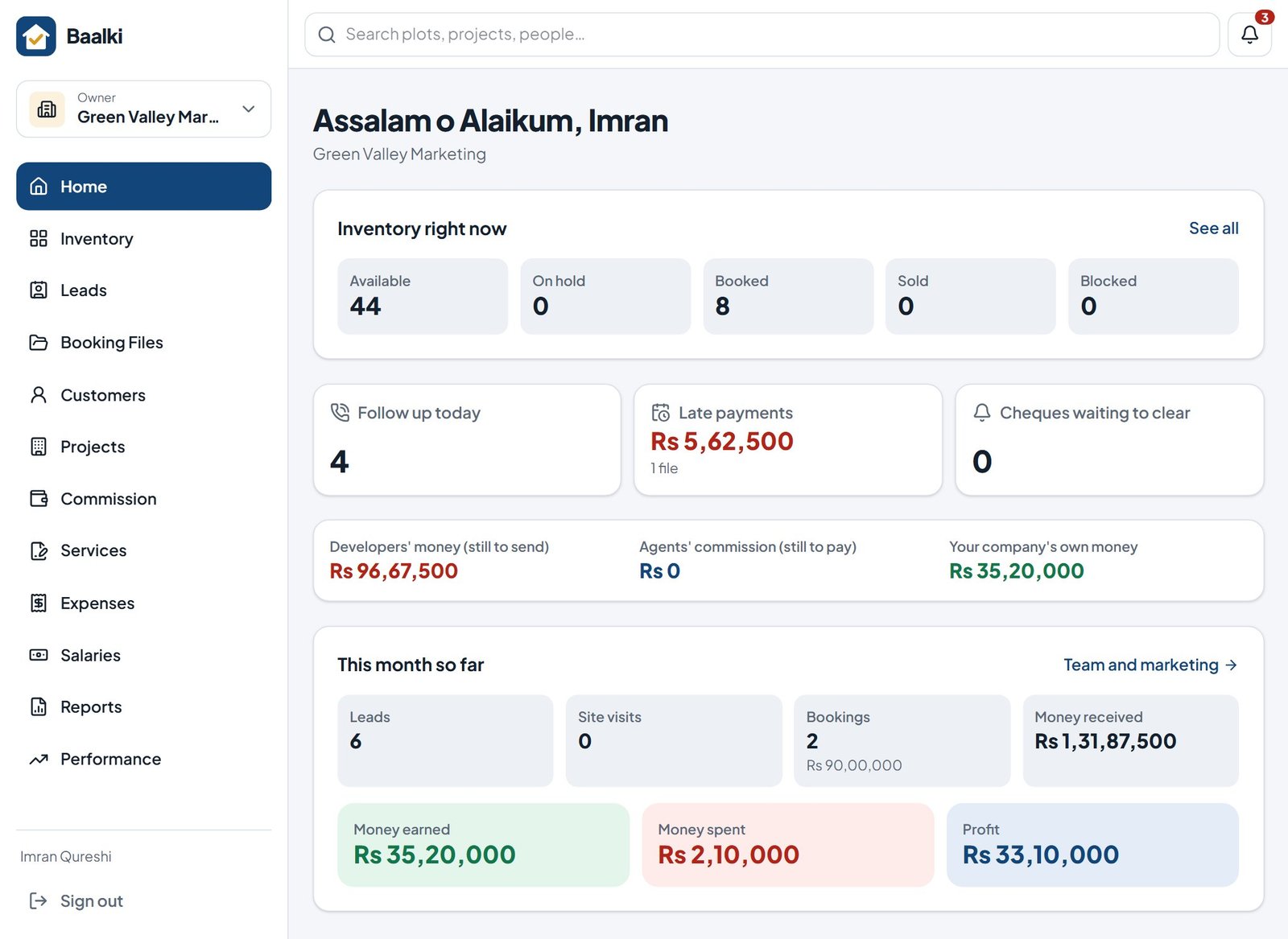
- The owner’s dashboard: stock, follow-ups, dues and money owed, always up to date.
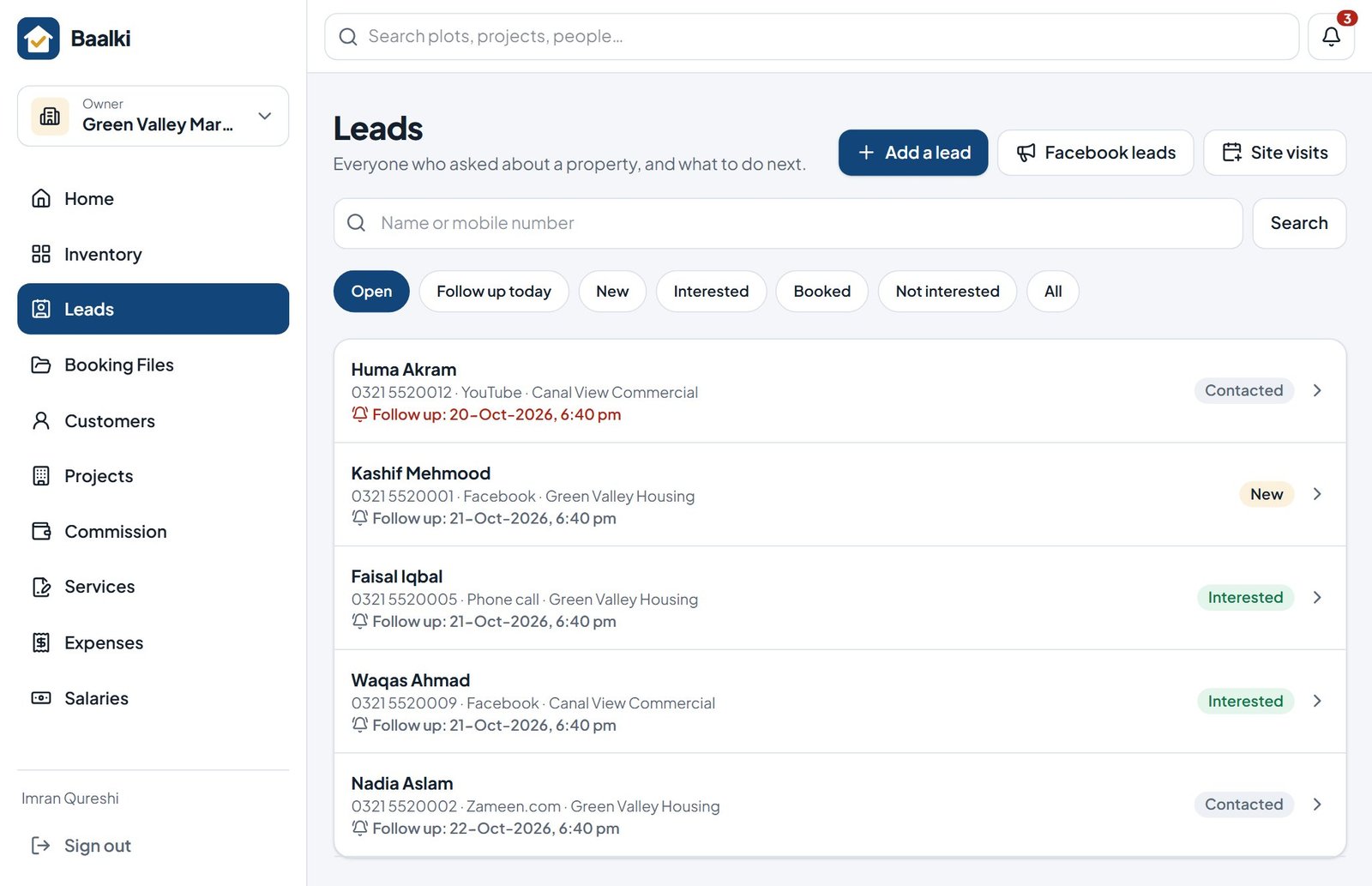
- Every enquiry in one list, with its source and next follow-up.
- A new enquiry from a Facebook ad: name, mobile number, project and budget.
- Set the next follow-up: Baalki reminds the team on the day.
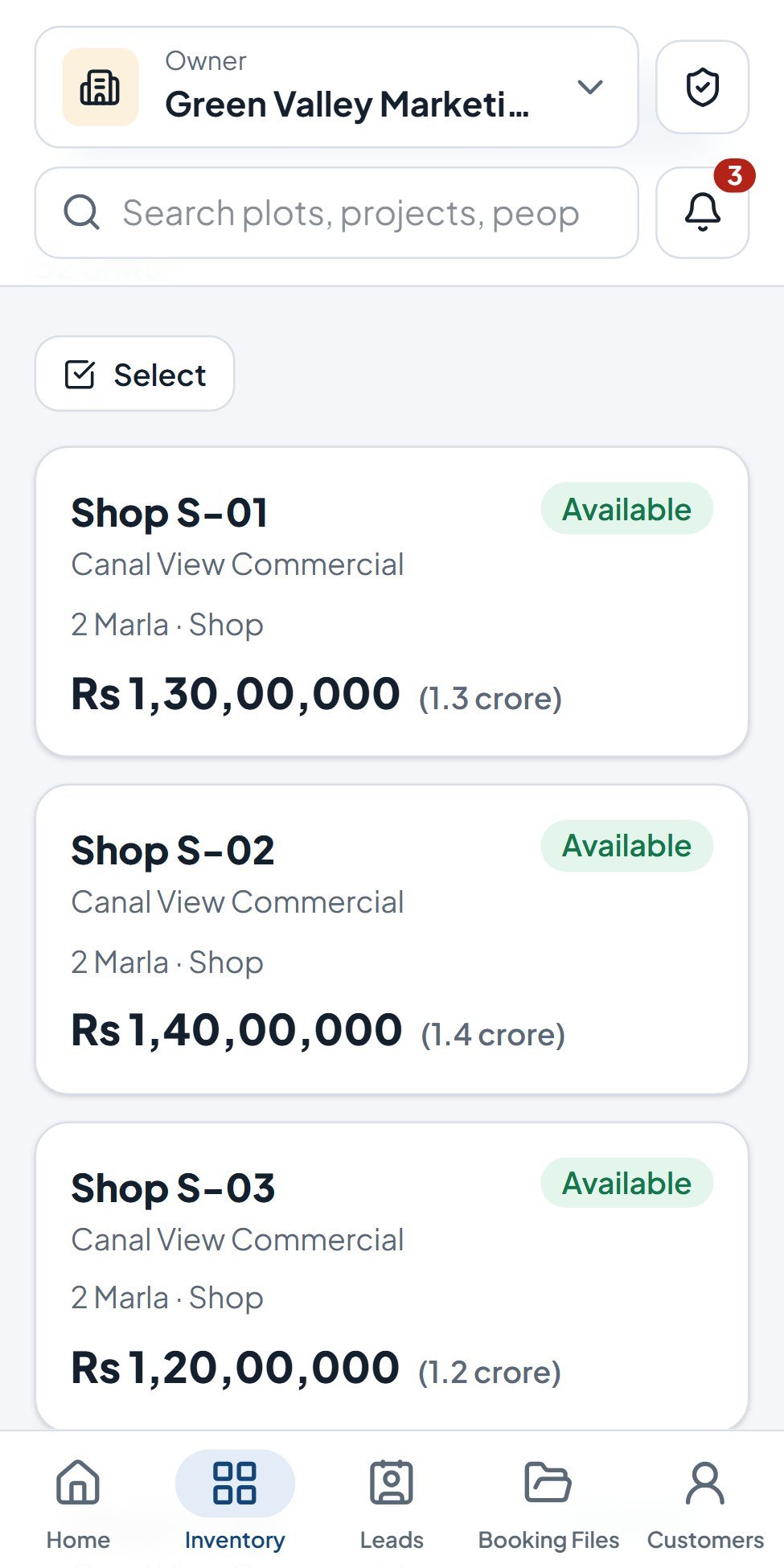
- Live inventory: every plot’s status, for the whole team.
- Hold the plot for a buyer: nobody else can sell it.
- Make the Booking File in three steps.
- Choose the payment plan: the full schedule is worked out.
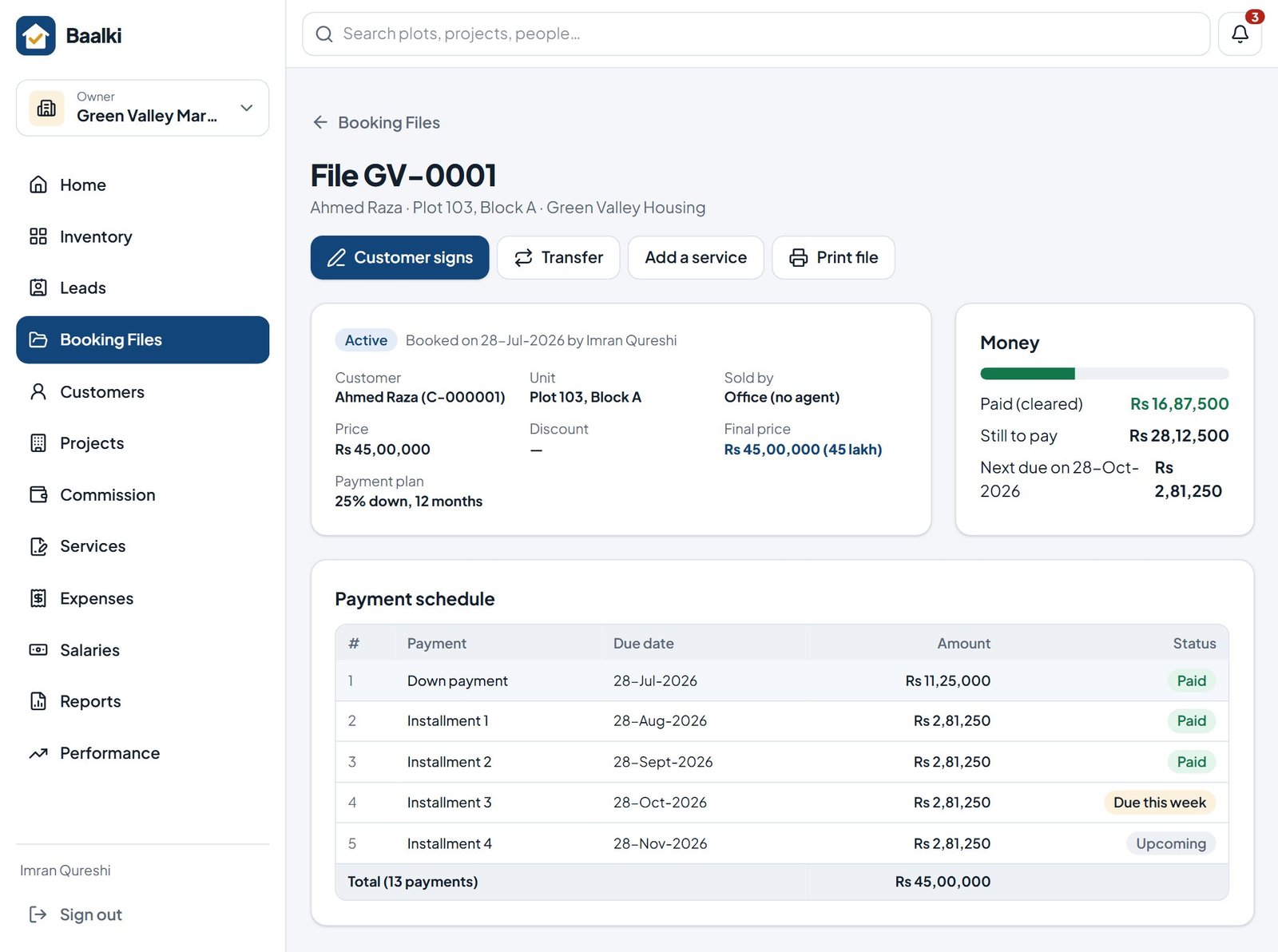
- Booking File made: the plot is booked and the schedule is ready to print.
- Record a payment: the receipt, balance and dues update at once.
- Back on the dashboard: everything is already up to date.
The owner’s view
Know your position before anyone has to ask
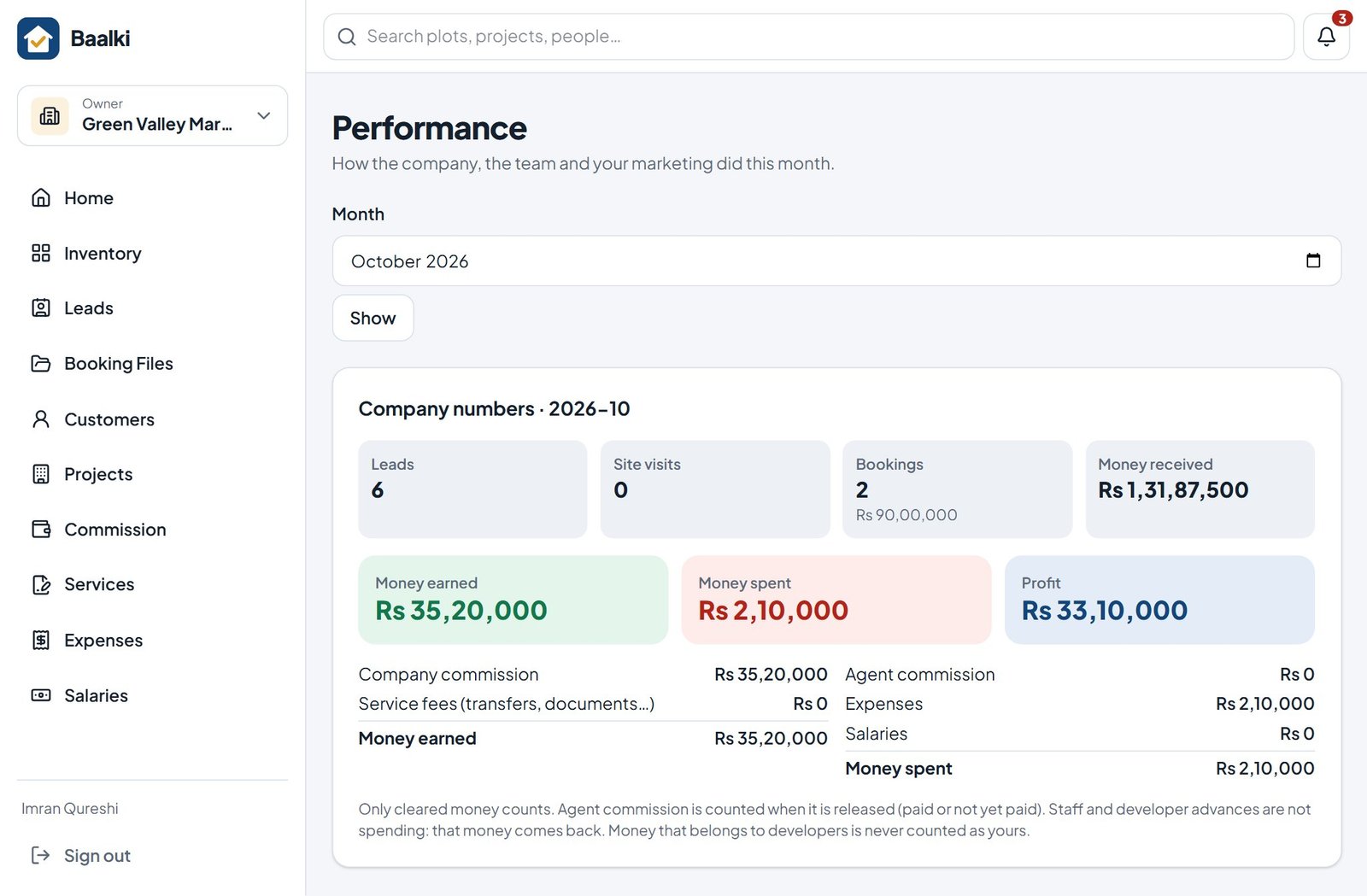
The Home screen answers the questions owners ask every morning. Each figure opens the records behind it.
- Inventory right nowAvailable, on hold, booked, sold and blocked units across every project.
- Follow-ups and late paymentsWho needs a call today, and how much is overdue, file by file.
- Developers’ money still to sendCash you hold that belongs to developers, per project.
- Agents’ commission still to payCommission released by cleared payments and ready to pay out.
- Your company’s own moneyWhat is genuinely yours after developer and agent shares.
Lead management
Give every enquiry a next step
Most sales are not lost to competitors. They are lost to a follow-up nobody made.
Baalki brings every enquiry into one shared pipeline with its source, project interest and next follow-up date, so managers can see what is moving and what is stalling.
- Sources tracked: Facebook, Zameen.com, YouTube, calls, walk-ins and referrals
- Status pipeline from New to Booked, with follow-up reminders
- Site visits planned and recorded, with optional GPS check-in
- Facebook lead-form exports imported in one step
- Exact quotations with down payment and installments, shared in seconds
Inventory and reservations
One live inventory your whole team can trust
A shared spreadsheet is out of date the moment someone makes a promise.
Every plot, house, flat and shop carries a status everyone sees in real time. Agents hold units from their phones for a set period, and holds release automatically if no booking follows.
- Available, on hold, booked, sold and blocked, updated live
- Hold limits per person, set by the owner
- Bulk price changes, numbered ranges and Excel import
- Society map that colours each plot by its status
- A read-only copy on the phone for sites without signal
Bookings and collections
Booking Files, receipts and dues without the paperwork
Create a Booking File in three steps and Baalki builds the complete payment schedule. Every receipt, cheque and installment is tracked against it until the last payment clears.
- Ready-made or custom payment plans with a live preview
- Cash, bank transfers and cheques tracked through deposit, clearing or bounce
- Dues list, oldest first, with one-tap WhatsApp reminders
- Files and receipts printed with your logo, a QR code and a Verification Code
- Customer signature captured on screen
Commission and reconciliation
Commission and developer money, calculated, not argued
Define each project’s terms once: your commission with the developer and each agent’s share. Baalki splits every cleared payment accordingly and keeps the developer’s money separate from yours.
- Proportional, commission-first or fixed-share split methods
- Agents see their own earnings, never the company’s commission
- Agent payouts with printed payout slips
- Developer statements per project, ready to reconcile together
- Cancellations, refunds and sole-rights advances handled by the rules
Control and accountability
Large amounts wait for the owner. Every action leaves a trail.
Give your team the freedom to work while you keep control of the money and a complete record of what happened.
Owner approvals
Agent payouts, transfers to developers, refunds and other money going out above the limits you set wait for the owner’s approval before they count.
History that cannot be quietly changed
Each unit’s history is sealed in order. Mistakes are reversed with a new entry; money records are never deleted.
Activity and sign-in log
See who changed what and when, and which devices signed in to your company.
Fraud and mistake alerts
Warnings such as one CNIC under different names, a discount above your limit, or a visit recorded far from the site.
Trust buyers can check
Every Booking File and receipt can be verified online
Each printed paper carries a QR code and its own Verification Code. A buyer, a bank or a family member scans it and sees whether it is genuine, along with your company, the project and the current file status.
- A transferred file shows TRANSFERRED on the old paper
- A cancelled file shows CANCELLED
- CNIC numbers, phone numbers and addresses are never shown
- Your company is notified when one of its papers is checked
Check a file or receipt
Scan the QR code on the paper, or enter the file number and Verification Code.
New in Baalki
Get paid on time, and let buyers see their own files
Two features built for how installments are really collected in Pakistan.
Recovery of late payments
Every late file, how late it is and today’s next step. Numbered reminders and notices on WhatsApp and on your letterhead, with calls and promises to pay recorded.
Buyer portal
Buyers see their files, schedule, receipts and statement on their phone, with your name and logo, and send payment proof to your office.
Customer story

From paper registers to a paperless office
Legacy Group, a real estate marketing company in Peshawar, moved its clients, files and payments from registers and Excel into Baalki.
We used to run everything on registers and Excel. Client details sat in different files and on different people’s phones, and more than once we lost track of a client and what they had paid. Now every client, file and payment is in one place. Nothing goes missing, the office is paperless, and I can see exactly where the business stands every day.
Built for every seat
Each person sees exactly what their role needs
Owners decide who can see and do what. Branch staff see their branch; agents see their own customers and earnings.
Owners and directors
The full position across projects and branches: inventory, collections, payables, profit and approvals.
Sales managers
Lead pipeline, follow-ups, site visits, team targets and a leaderboard to keep momentum.
Agents and dealers
Live inventory, holds, quotations and their own commission, from the phone.
Accounts and office staff
Booking Files, receipts, cheques, dues, expenses, salaries and printable reports.
Developers
A private, read-only view of their own projects’ sales and money, only if you invite them.
Your customers
Their own buyer portal with files, receipts and statements, and papers they can verify online.
Guided setup
Live in days, with our team beside you
Every company starts with a guided setup, so your projects, terms and history are right from the first day.
- Live demoWe see how your company sells today and show Baalki with your workflow.
- Company setupDevelopers, projects, commission terms, inventory and payment plans configured with you.
- Your history moved inCustomers imported from Excel; existing Booking Files entered with past payments.
- Team go-liveStaff invited by WhatsApp link, each with the right role and a short walkthrough.
Coming soon
Baalki Brain: an assistant inside the app
Ask how to do something, have a dashboard figure or a commission split explained, or get a summary of overdue follow-ups and payments, in plain language.
Designed to be safe
- Reads only what your role is allowed to see
- Never changes money, bookings or inventory without a person’s confirmation
- Shows the records behind every answer
Questions
What owners ask before switching
Who is Baalki built for?
Real estate marketing companies in Pakistan: the firms that sell plots, houses, flats and shops in housing societies on behalf of developers, with agents and dealers in the field. It fits a single office or a multi-branch company.
Do we need an accountant or IT person to run it?
No. Commission, developer money and dues are calculated for you and explained in plain language. Your team works through guided screens on a phone or computer, and our team sets the company up with you.
Can agents use it on their phones?
Yes. Baalki runs in any phone browser and can be added to the home screen like an app. Agents check live inventory, hold units, record leads and see their own commission. Inventory, the society map and quotations stay available without signal.
Can we bring our existing records?
Yes. Customers can be imported from Excel, and existing Booking Files can be entered with the payments already received, so balances and dues are correct from day one.
How is our data protected?
Each company’s data is kept separate from every other company, people see only what their role allows, and money records are never deleted. Read the details on our Security & data page.
Guides
Practical guides for real estate companies
Next step
See Baalki working with your own projects
Book a 30-minute live demo. We walk through your sales and money workflow, answer your questions and recommend the right setup for your company.
15-day trial with every feature · No card required